Manual ACSI Campsites Europe app
1. Downloading or updating the app
You can download the ACSI Campsites Europe app free of charge from the Apple App Store or Google Play Store.
Already installed the ACSI Campsites Europe app? You do not need to download a new app. Update your existing app via the App Store or Google Play Store. This is an update to the existing app.

Choose the right app
Please note: there are several ACSI apps. Search for ACSI Campsites Europe and check that the developer is ACSI Publishing BV.

Android
Open the Google Play Store and search for the ACSI Campsites Europe app. Tap Install to download the app or Update to update your existing app.
The app is compatible with Android 13 and above. Check the current system requirements in the Google Play Store.


Apple iOS
Open the Apple App Store and search for the ACSI Campsites Europe app. Download the app or tap Update if an update is available.
The app is compatible with iOS 16 and above. Check the current system requirements in the App Store.


2. Accessing information in the app
There are three ways to access campsite and motorhome stopover information in the ACSI Campsites Europe app:
- Through an ACSI Camping Guide that includes access to the app. Follow the instructions provided with the guide to activate your access.
- Through a subscription in the ACSI webshop.
- Through a subscription in the app, paid via the Apple App Store or Google Play Store. Choose from 1 month (€ 1.99), 3 months (€ 4.99) or 1 year (€ 9.99).
Already have access?
Log in with the My ACSI account linked to your access. You do not need to take out another subscription.

3. Offline use
With a valid subscription and an internet connection, you can view campsite and motorhome stopover information straight away. Planning to use the app without an internet connection? Download the countries you need in advance so you can also access the information offline.
- Go to ‘More’.
- Select ‘Use offline’.
- Download the countries whose information you want to view without an internet connection. Wait for the downloads to finish.
Before using the app without an internet connection, you also need to switch it to offline mode. Go to ‘More’, select ‘Use offline’ and enable ‘Use app offline’.
Some features are not available offline. For example, you need an internet connection to make a booking or visit a campsite website. To do this, connect to the internet and turn off offline mode.

4. Searching on the map
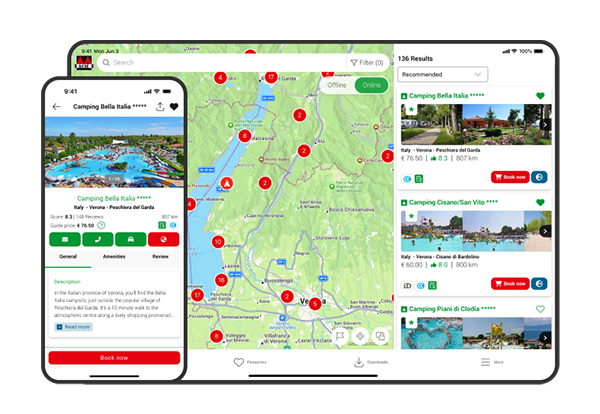
You can use the map to view campsites and motorhome stopovers.
If you allow the app to use your location and location services are enabled on your device, your location appears as a blue dot on the map. You can zoom in and out and move around the map to view specific places or regions.
There are three different icons on the map:
- Campsite
- Campsite bookable through this app
- Motorhome stopover
Tap a campsite or motorhome stopover on the map to view more information.

5. List view
You can also view campsites and motorhome stopovers in a list instead of on the map. To do this, tap ‘Show list’.
- The list is automatically sorted by ‘Recommended’. You can also change the sorting order, for example to Review, Bookable or Distance.
- Please note: the distance shown is as the crow flies. The driving distance to the campsite or motorhome stopover may therefore differ.
- Tap a campsite or motorhome stopover in the list to view all the information.

6. The search and filter function
Use filters to select the features and facilities that matter to you at a campsite or motorhome stopover. You can select filters yourself or use the smart filters.
Selecting filters yourself
Open the search and filter function and select the filters that match your preferences. Want to book through the app? Use the filter that only shows campsites you can book through the app.
Using smart filters
With smart filters, you describe the features or facilities you are looking for. For example, enter ‘Campsite by the sea’ or ‘Campsite with a swimming pool’ and tap ‘Show matching filters’. The app then finds filters that match your description.
Please note: this field is only intended for features and facilities. You cannot use it to search for a country, place name or campsite name. For example, if you enter ‘Campsite in France by the sea’, France will not be included as the search area. Use the map to select an area.
Check the suggested filters and adjust them if necessary. You can add or remove filters to refine your selection. No suitable results? Remove one or more filters or view another area on the map.

7. Saving favourites, planning a route and viewing campsite websites
- Save a favourite: tap the heart.
- Plan a route: tap the car icon on the campsite details page. You can then view the route to the campsite directly in Google Maps.
- View a campsite website: for some campsites, you can visit their own website. To do this, tap the globe icon.
Your saved favourites are kept when you update the app.

8. Booking directly
At campsites that are bookable through the app, you can book a touring pitch directly. To do this, tap ‘Show availability’.
Follow the steps in the booking process and check the details and terms before completing your booking. You need an internet connection to book.
Want to contact the campsite first? Use the available contact details to email or call. An email asking about availability is not a confirmed booking.

9. Reviewing a campsite
Tap ‘Reviews’ to read campsite reviews. You can also leave your own review to help other campers.
It is currently not possible to leave a review for motorhome stopovers.

10. More menu
Tap ‘More’ to open the More menu. Here you will find the following sections:
My ACSI account
Here you can find your account details. You can also delete your account here.
My subscriptions
Here you can find information about your subscriptions. Did you subscribe via the Apple App Store or Google Play Store? Manage your subscription in that store's subscription settings. You can also turn off automatic renewal there.
Offline use
Here you can download countries you want to access offline. You can also switch the app to offline mode here.
Settings
Here you can change settings such as the app's language.
Help centre
Here you can contact our customer service team or view the app manual, for example.
11. Using the app on multiple devices
You can use the app on up to three devices at the same time with the same My ACSI account.
Going on holiday with your partner? You can both install the app on your smartphones and on a tablet as well.
Download the app on each device and log in with the same My ACSI account. Want to use the app offline on multiple devices? Download the countries you need separately on each device.